Smart Agriculture Advisory System
A Raspberry Pi planted in a pot of soil that reads the plant's vitals and tells a farmer what to grow, how much water it needs, and what fertilizer to use, built with two teammates for Electronics Service to Society (ESS), a VJTI course under Prof. Rohin Daruwala.
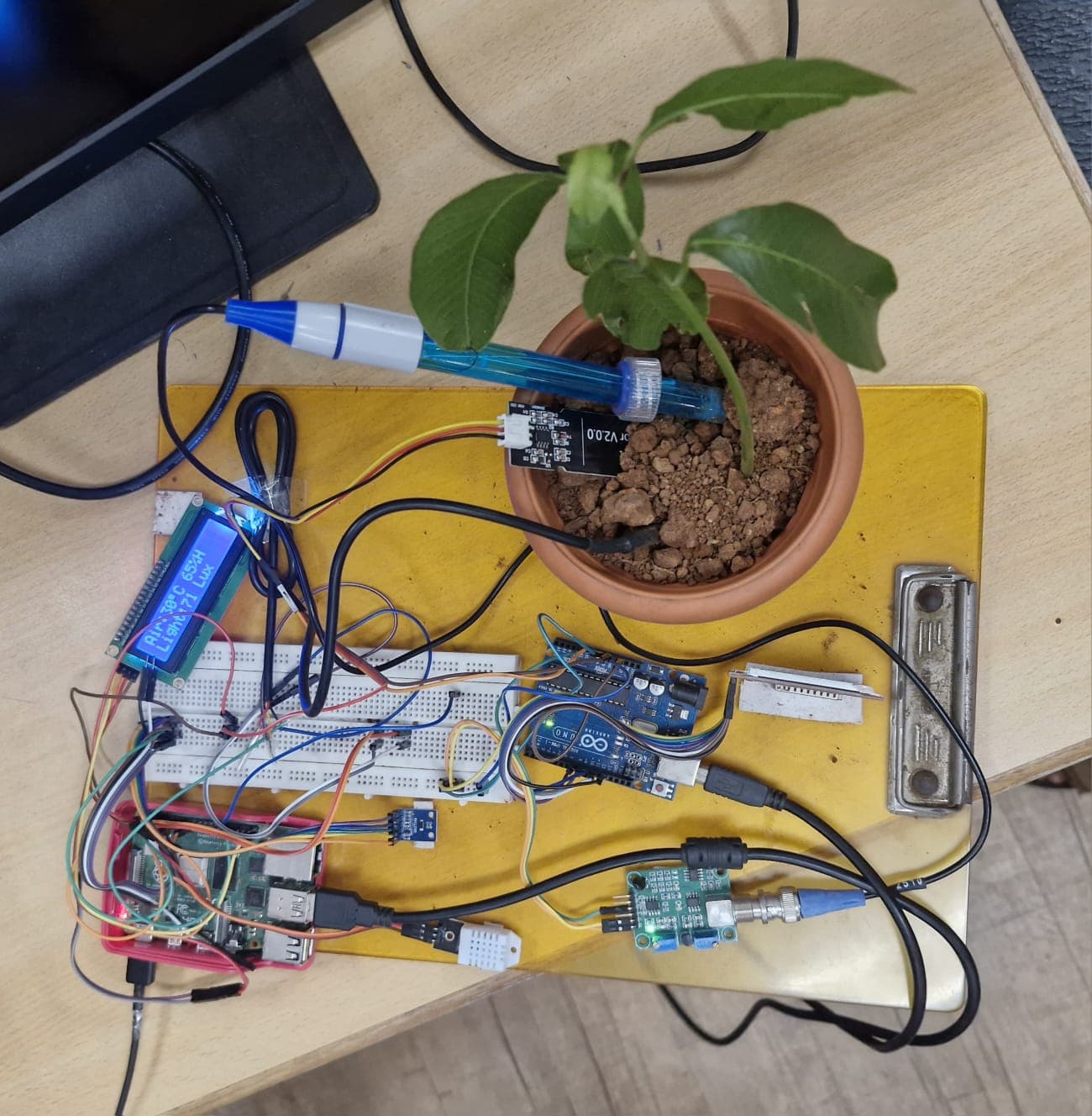
Most farmers still decide what to plant, when to water, and what fertilizer to buy by gut feeling, passed down experience rather than data. Along with two teammates, Rugved Bhalekar and Prathamesh Thanekar, I built a system that tries to replace that guesswork with actual numbers, for Electronics Service to Society (ESS), a VJTI course under Prof. Rohin Daruwala. We wired up a potted plant with real sensors, hooked it to a Raspberry Pi, and built four machine learning models that turn raw soil and weather readings into plain advice: plant this crop, water it this much, use this fertilizer, and expect this yield.
The hardware side reads six things off the plant in real time: soil moisture, soil temperature, soil pH, air temperature, humidity, and light, using an Arduino Uno and a handful of sensors wired into the Pi. That data feeds a small on-device dashboard (a 16x2 LCD and a color TFT screen) so you can walk up to the pot and read its live readings directly, no phone or laptop needed. It also drives a full web dashboard with live gauges and historical charts, plus a Telegram bot so a farmer away from the pot, out in the field or anywhere else with just a phone, can ask questions and get answers.
The interesting engineering problem was making four separate ML models work together as one coherent advisory system: crop recommendation, yield prediction, irrigation advice, and fertilizer advice, each trained on a different Indian agricultural dataset, each an XGBoost model chosen for being fast enough to run inference directly on a Raspberry Pi with no cloud round trip. We also built a fallback for farmers who don't have lab tested soil nutrient numbers. Pick your soil's color (red, black, alluvial) from the dashboard and the system maps that to approximate nutrient levels instead of failing to work.
The last piece was wiring an AI agent called OpenClaw, an agentic framework that can read sensor files and run code directly on the device, into a Telegram bot. So instead of a rigid menu of commands, a farmer can just ask a normal question and get back sensor readings, predictions, and advice in plain language. That's genuinely useful in a rural setting where a full dashboard isn't always the easiest thing to reach for.
How it works
Sensors (DHT22 for air temp/humidity, a capacitive soil moisture probe, DS18B20 for soil temperature, BH1750 for light, plus a pH-4502C probe) constantly report readings into a daemon running on the Raspberry Pi, which is the system's single hub.
The Pi has no analog input pins, so the two genuinely analog sensors, soil moisture and pH, are wired into an Arduino Uno instead. The Arduino reads them over its ADC and relays the values to the Pi over serial, while everything else (the digital/I2C/1-Wire sensors, the LCD, and the ML inference) is handled directly by the Pi.
Those readings are logged to a local SQLite database and pushed to a FastAPI backend, which is the single source of truth the rest of the system reads from.
Four independently trained XGBoost models (crop recommendation, yield prediction, irrigation advisory, and fertilizer advisory) take the live sensor data, or manually entered values, and turn it into concrete recommendations.
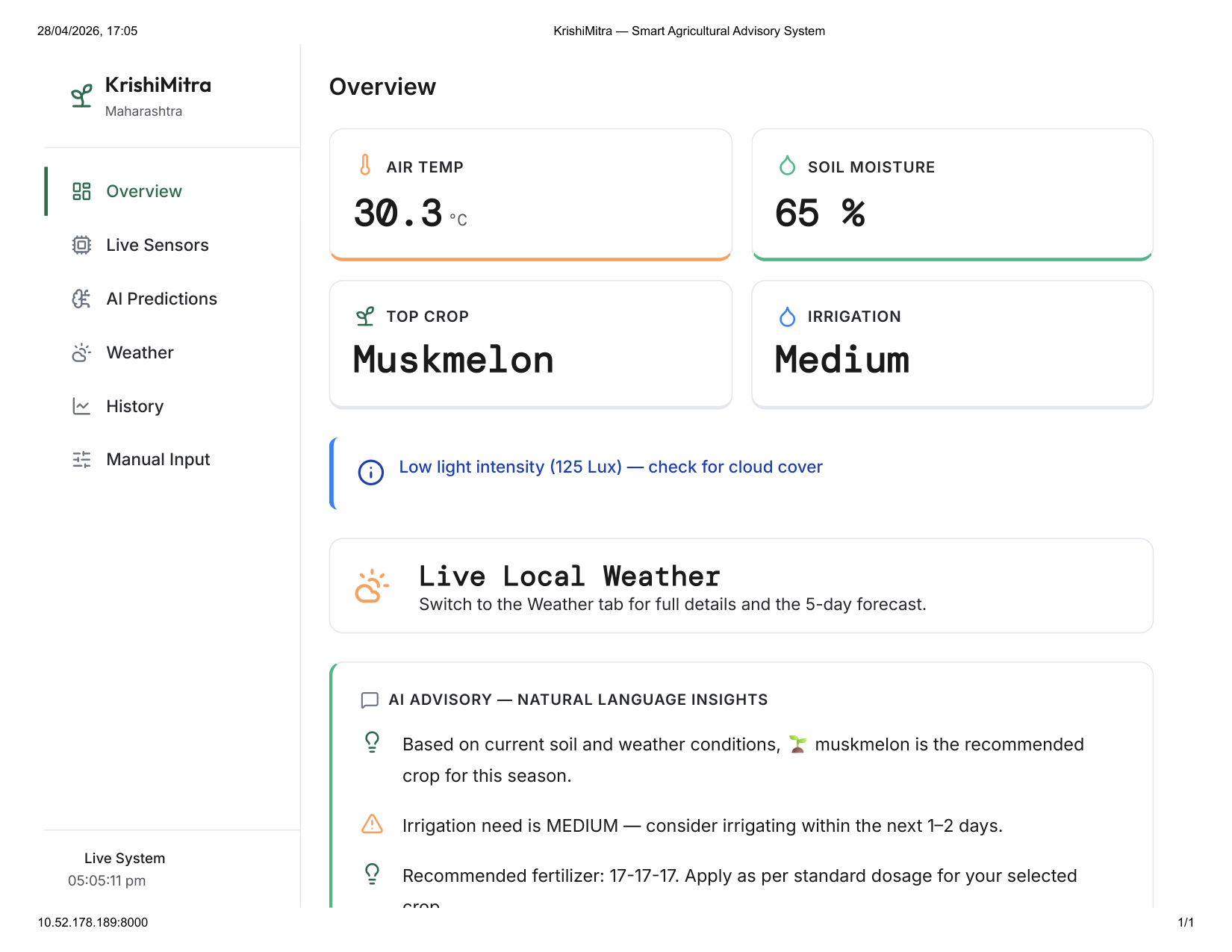
A React dashboard shows live sensor gauges, historical trend charts, weather forecasts pulled from a weather API, and the model outputs, built for someone checking in from a laptop or phone.
OpenClaw, an agentic framework, runs directly on the Pi itself rather than in the cloud, so it has real file and shell access on the device: it reads the live sensor state and SQLite history straight off disk and can run its own Python/shell code to check on things. It's wired to a Telegram bot so a farmer can ask a plain-language question and get back live readings, predictions, and alerts, no dashboard required. An AGENTS.md file defines escalation rules it follows, for example, recognizing that a soil moisture reading stuck at exactly 0% almost always means the Arduino has been disconnected, not that the soil is actually bone dry, and reporting that distinction instead of just repeating the raw number.
Technical Breakdown
The system architecture below is the real block diagram used to plan and wire the build, and the schematic is the exact circuit that was breadboarded. Together they show how every sensor, the Pi, the Arduino, and both displays are actually connected.
System architecture: how every piece connects
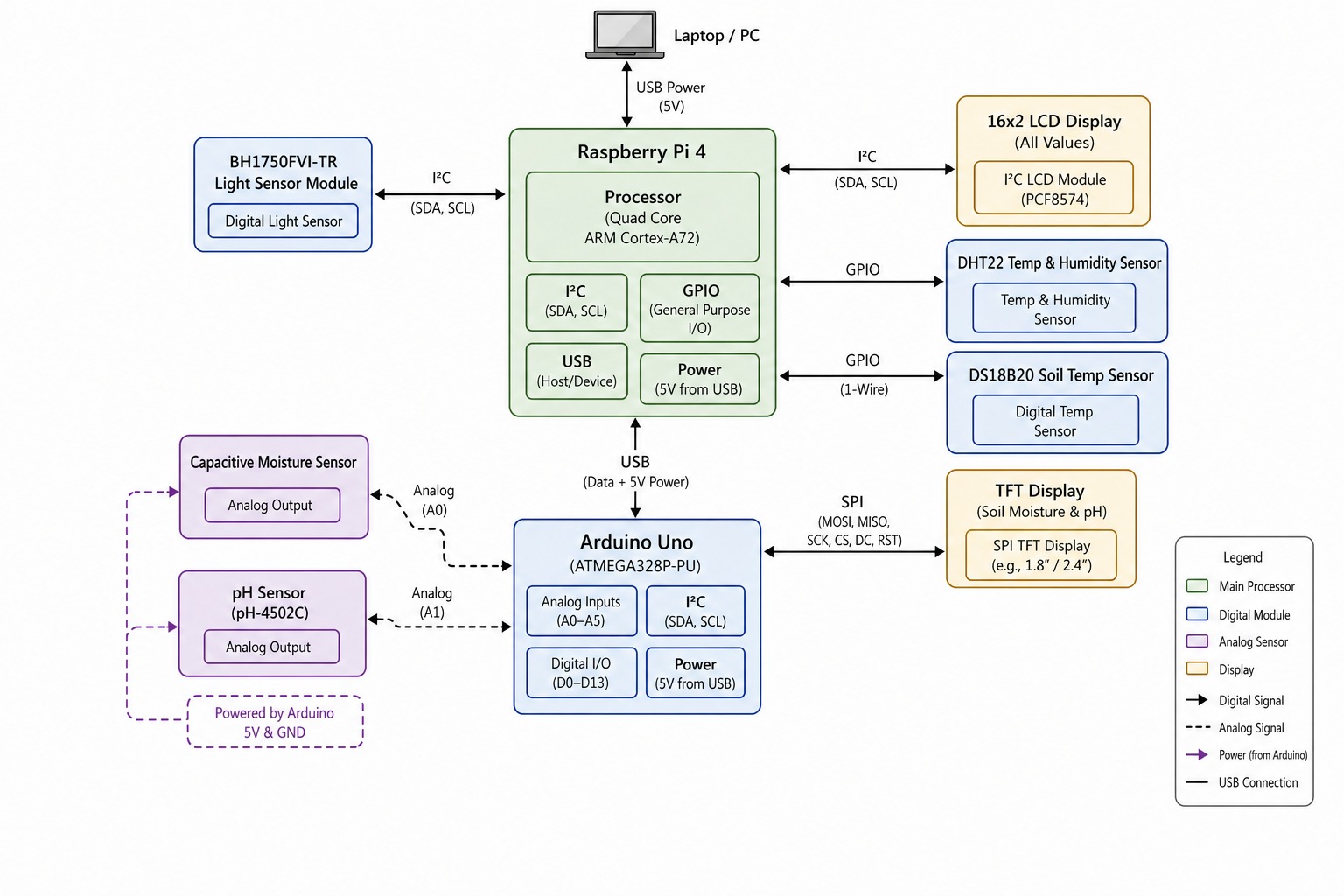
The Raspberry Pi 4 (its quad-core Cortex-A72, green box) is the hub, powered over USB from a laptop/PC. It talks I2C directly to the BH1750 ambient light sensor and to the 16x2 LCD, and reads the DHT22 (air temp/humidity) and DS18B20 (soil temp, over 1-Wire) straight off its GPIO pins. Because the Pi itself can't read analog voltages, a USB link carries both data and 5V power down to an Arduino Uno, which exists purely to bridge the two genuinely analog sensors, a capacitive soil moisture probe and a pH-4502C probe, into digital values the rest of the system can use. That same Arduino also drives a small SPI color TFT locally, so the moisture and pH numbers are visible right at the pot without needing the web dashboard. In short: the Pi owns the digital sensors, the display, and the ML inference; the Arduino's only job is being a dedicated analog-to-digital bridge for the two sensors that need one.
Full wiring schematic
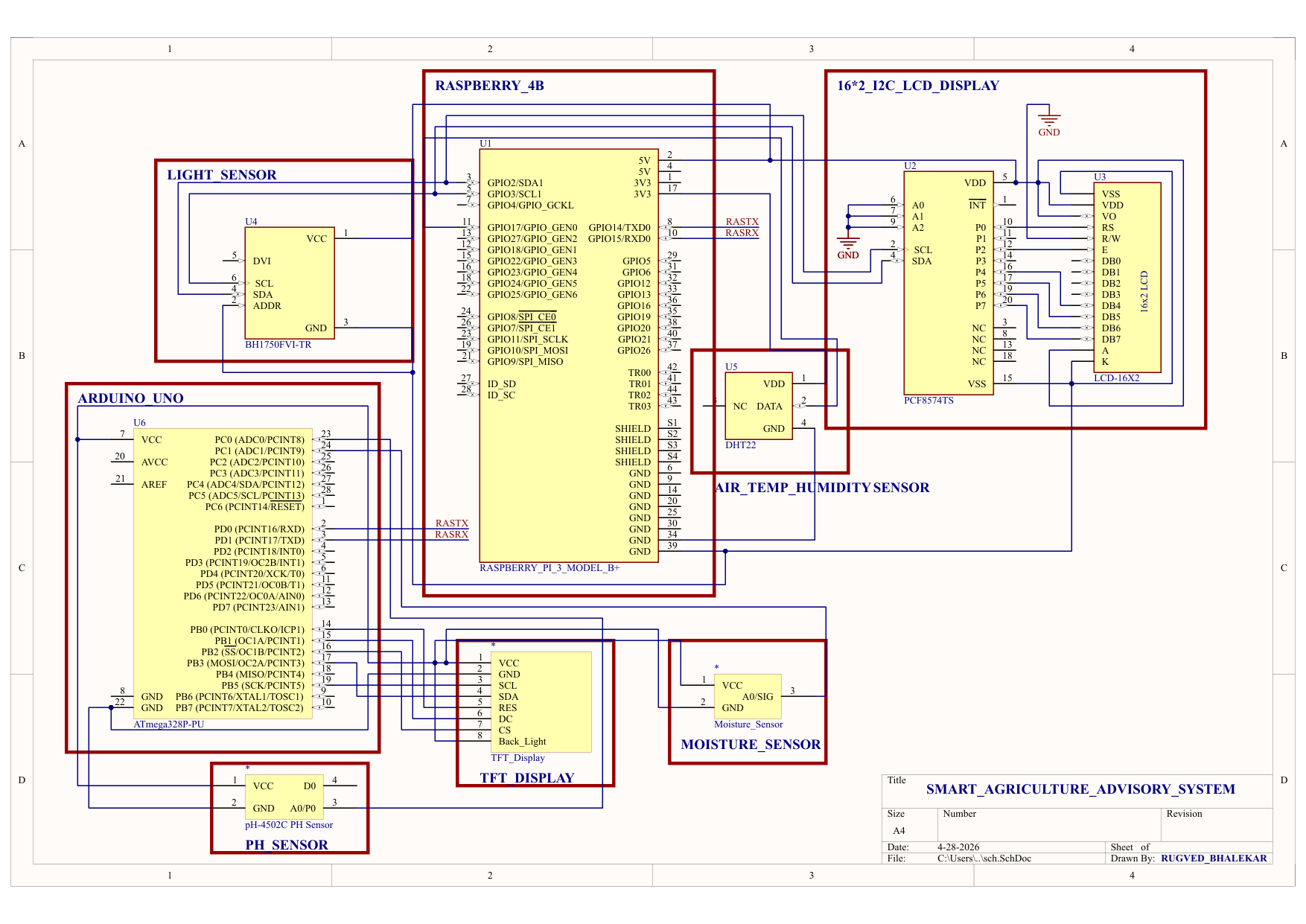
The exact circuit schematic behind the block diagram above: the BH1750 and the PCF8574-backed 16x2 LCD on the Pi's I2C bus, the DHT22 on a GPIO pin, RASTX/RASRX serial lines carrying the Arduino's moisture and pH readings back to the Pi, and the Arduino's own SPI lines (MOSI/MISO/SCK/CS/DC/RST) driving the local TFT.
Website Screenshots
OpenClaw agent, live on Telegram
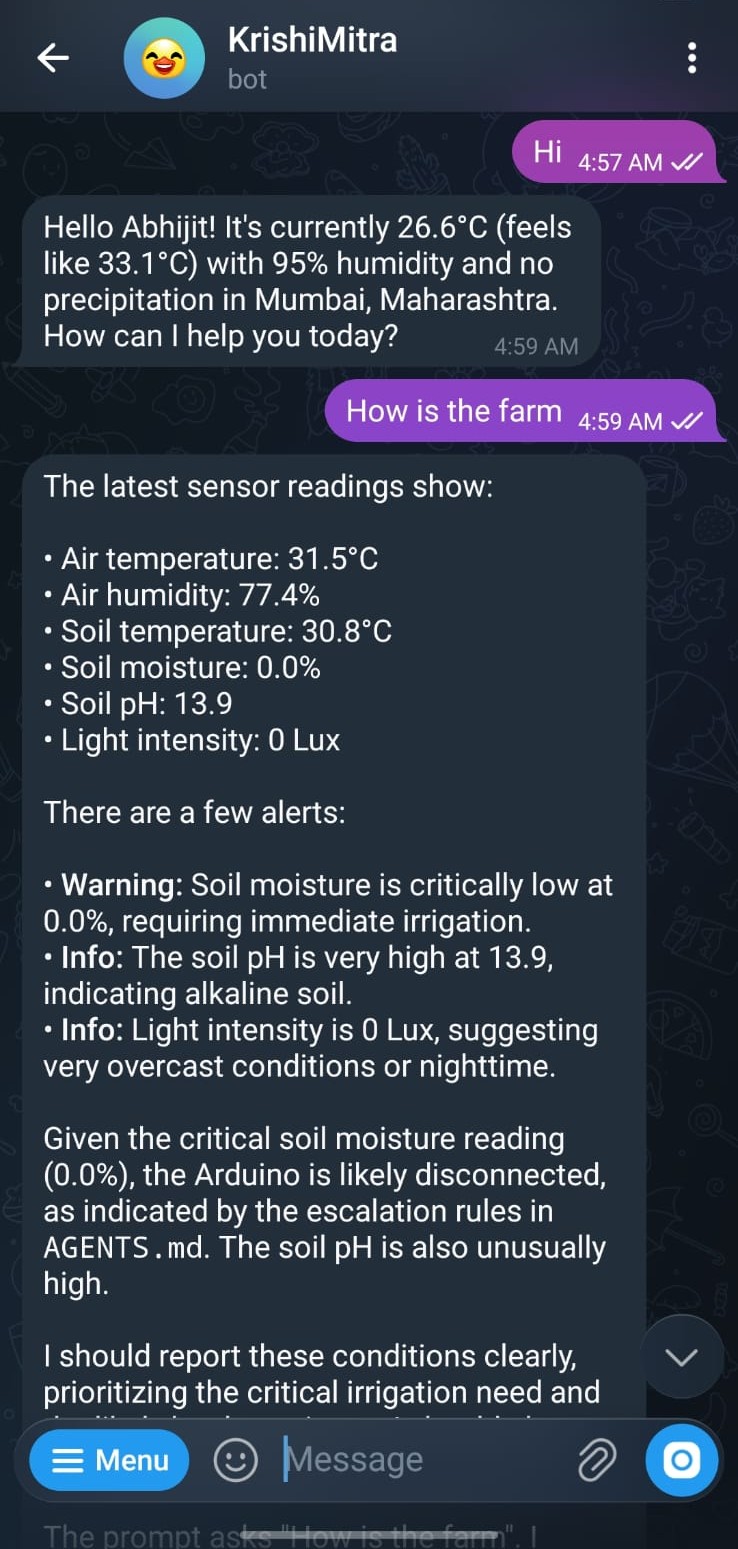
The bot, KrishiMitra, running on OpenClaw directly on the Pi. Asked "How is the farm", it doesn't return a canned template, it pulls the actual live sensor values (air temp, humidity, soil temp, soil moisture, pH, light) at that moment, flags what's actually wrong (soil moisture reading a critical 0.0%), and reasons about the likely cause using the escalation rules in its AGENTS.md, correctly inferring the Arduino was probably disconnected rather than just reporting a scary number at face value.