MCPAudit
A security scanner for MCP server configs, the files that decide which tools an AI assistant like Claude or Cursor is allowed to touch on your machine. Paste your config in and get a full risk report, mapped to the OWASP MCP Top 10.

When you connect an AI assistant like Claude Desktop or Cursor to a tool through MCP (Model Context Protocol), you're handing that tool a key to your machine. It might get access to your filesystem, your shell, your browser, or your API keys. Most people copy a config snippet from a GitHub README, paste it in, and never look at it again. MCPAudit exists to show what's actually hiding in those configs.
You paste your MCP config in and it comes back with a full report: what's dangerous, how dangerous, and why. Under the hood it runs 54 separate checks across 11 categories, hardcoded secrets and API keys, typosquatted or malicious packages, servers asking for way more filesystem or shell access than they need, prompt injection hidden inside tool descriptions, invisible unicode characters used to smuggle instructions past a human reviewer, and more. Every finding gets mapped to the OWASP MCP Top 10, a CWE ID, and a MITRE ATT&CK tactic, so it reads like a real security report and not just a list of warnings.
For a recruiter reading this: the project is a monorepo with three real, working pieces. A FastAPI backend running the scanning engine and 335+ tests, a Next.js frontend for the paste-and-scan web flow, and a Go CLI that runs the entire 54-check engine completely offline, so nobody has to trust me with their config if they'd rather not. All three are wired into a GitHub Actions CI pipeline, and the tool ships its own GitHub Action so other projects can run MCPAudit as a security gate on every pull request.
The research side mattered as much as the code. Several of the checks come directly out of published security research on MCP, papers on indirect prompt injection, tool poisoning, and a UI exploit where a malicious instruction gets hidden off-screen inside a horizontal-scrolling approval dialog. Reading that research and turning it into a working, testable check was most of the real learning here, not just about MCP, but about how to think like an attacker when you're building a scanner meant to catch one.
How it works
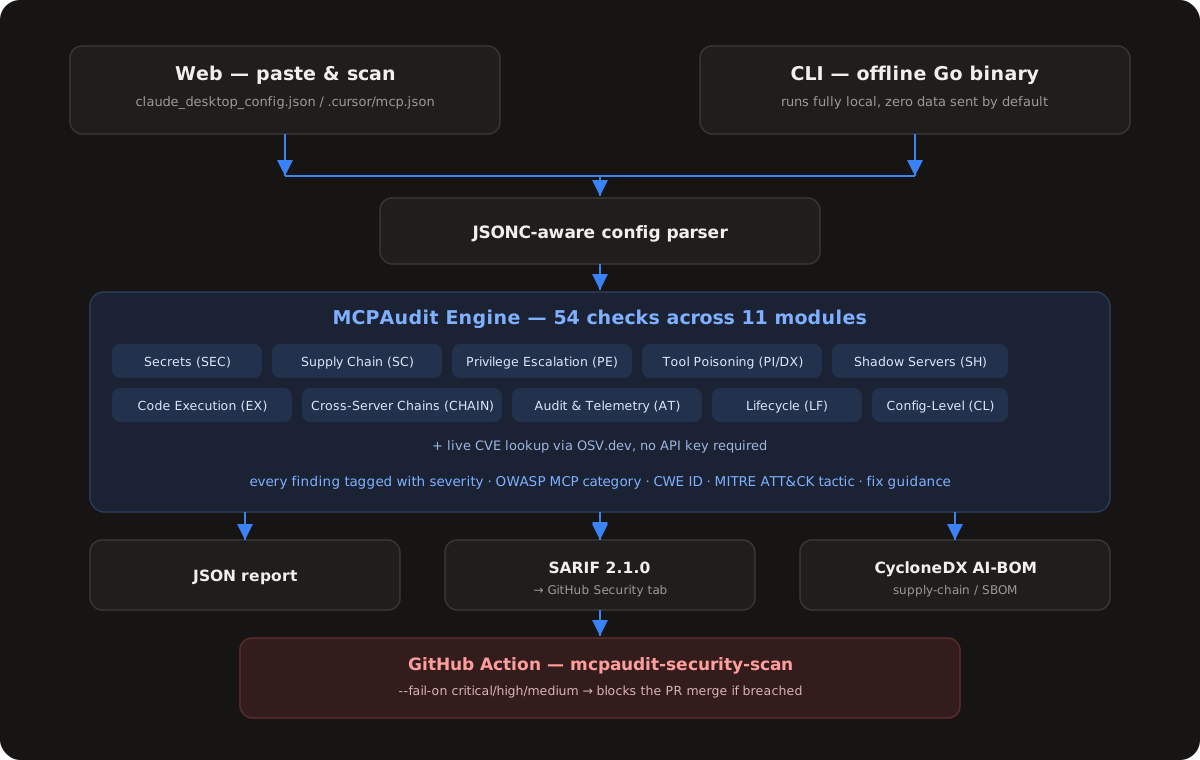
You give MCPAudit a config, either by pasting it into the web app or by running the offline CLI against your local claude_desktop_config.json or .cursor/mcp.json.
A JSONC-aware parser reads the config (comments and all) and hands it to the scanning engine.
The engine runs all 54 checks across 11 modules: secrets, supply chain risk, privilege escalation, prompt injection and tool poisoning, shadow or unverified servers, dangerous code execution patterns, and more. It also does a live CVE lookup against OSV.dev for any pinned package versions.
Every finding comes back with a severity, an OWASP MCP Top 10 category, a CWE ID, a MITRE ATT&CK tactic, and plain-language remediation advice.
Results can be exported as JSON, as SARIF 2.1.0 (which uploads directly into GitHub's Security tab as code scanning alerts), or as a CycloneDX AI-BOM for supply chain compliance.
Drop the included GitHub Action into any repo's CI pipeline and it will scan your MCP config on every push or pull request, failing the build if it finds anything above the severity threshold you set.
Website Screenshots